US Dollar
A Complete Guide to Customizing Your Blackburn Order
TLDR: Customizing your marking products doesn’t have to be complicated, especially with Blackburn. Start with the basics, choose the right size and print options, lean on design support when needed, and order early to get the best results with less stress.
Key Takeaways:
Start with the basics. Color, size, and print options have the biggest impact on how your product looks and performs in the field.
Size and layout matter more than you think. The right size and print area improve legibility and visibility, especially for signs, flags, and tags.
You don’t have to design it alone. Blackburn’s designers help fine-tune layouts so your branding and messaging stay clear and effective.
Plan ahead for better results. Digital press printing offers speed, but ordering early gives you more flexibility, fewer compromises, and more time to collaborate.
There’s a difference between something that simply does the job and something that looks like it was done on purpose.
A crisp yard sign. A banner that pulls people in. Marking flags on a jobsite that add clarity, not clutter. That’s customization done right.
Whether you’re promoting a business, organizing a site, or preparing for an event, custom marking products help you communicate clearly and look professional while you do it.
And despite how great custom products look, customization doesn’t have to be complicated. The process can start with a few simple choices and scale up when you need it to.
This guide walks through exactly how to customize your Blackburn Manufacturing Co. order, so you can get exactly what you want without slowing down or overthinking it.
Step One: Choose the Right Product
Before you think about colors or artwork, start with function. What do you actually need this product to do?
Blackburn offers customizable products across a few core categories:
Flags: Our custom marking flags work great for branding, utility marking, and as custom irrigation flags.
Signs: We have several options for custom marking signs, including field plot signs, custom corrugated plastic signs, and custom yard signs with stakes.
Tags: Door tags, ID tags, service tags, irrigation tags, mower measures…we have it all!
Stickers and Decals: Blackburn’s custom window clings, decals, and stickers are the perfect durable identifiers, safety labels, and branding pieces.
Tape: Choose from custom caution tape, custom barricade tape, and custom flagging tape.
Banners: The largest, most vibrant option for custom business signs.
Fan Signs: Event-ready big heads, photo cut-outs, and custom hand fans.
If you’re marking utilities, organizing a jobsite, promoting a business, cheering on a team, or guiding foot traffic, there’s a product built for that purpose.
Step Two: Dial In the Basics That Make the Biggest Impact
This is where customization really begins. These choices shape how your product looks, reads, and performs in the real world.
All of these options can be selected right on the product page, and if you run into any questions, our team is ready to guide you through each step.
Color
Color affects visibility, clarity, and recognition. Safety colors grab attention fast. Brand colors build familiarity and credibility. And sometimes the smartest option is to combine both: high-contrast backgrounds with brand-forward ink.
You have the power to choose how many colors you want in your print.
Blackburn offers a wide range of standard ink colors, plus Pantone matching when brand consistency matters. Our UV-resistant inks help ensure your message stays readable outdoors, even in tough conditions like sun exposure and weather swings.
Good to know: there’s no fee for changing ink or flag colors, so you don’t have to compromise to stay on budget.
Size, Shape, and Print Area
More space isn’t always better. The goal is legibility: clear, quick, and easy to read at a glance.
Across Blackburn products, there’s a range of size options to choose from. The size you select affects the available print area, so it’s important to think about how much information you actually need to include.
Larger sizes give you more room, but that doesn’t mean you should use every inch. Clean layouts and breathing room help your message stand out.
A few size-selection tips:
Choose larger sizes for products meant to be read from a distance, like yard signs or banners.
Keep messages short for smaller flags and markers to maintain clarity.
Prioritize contrast and spacing over squeezing in extra words or graphics.
For flags and signs, the print area depends on the product size, and choosing the right option keeps text sharp and uncluttered. Short messages, clear wording, and the right proportions go further than trying to fit too much in.
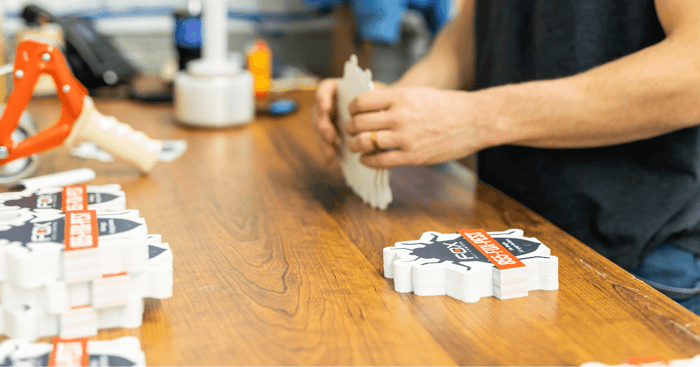
For marking signs, shape can also play a role. You can create custom cut yard signs with unique silhouettes that draw attention. Check out the shaping on the example below.
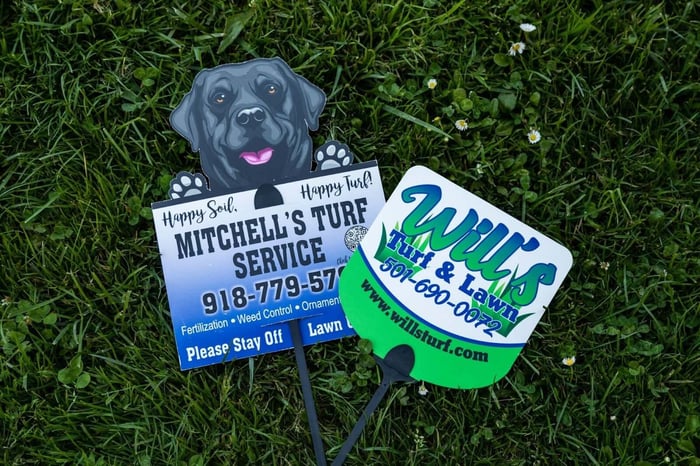
Personalized shapes make a strong impact for custom business yard signs, especially in front of offices, job sites, or event spaces, and in competitive markets where standing out matters.
One-Sided or Two-Sided Printing
Blackburn offers both one-sided and two-sided printing options across a range of products.
If your sign or flag needs to be read from multiple directions, two-sided printing can improve visibility and reduce confusion, especially in open areas or higher-traffic environments. Tags can feature branding on one side and service details, warnings, or instructions on the other.
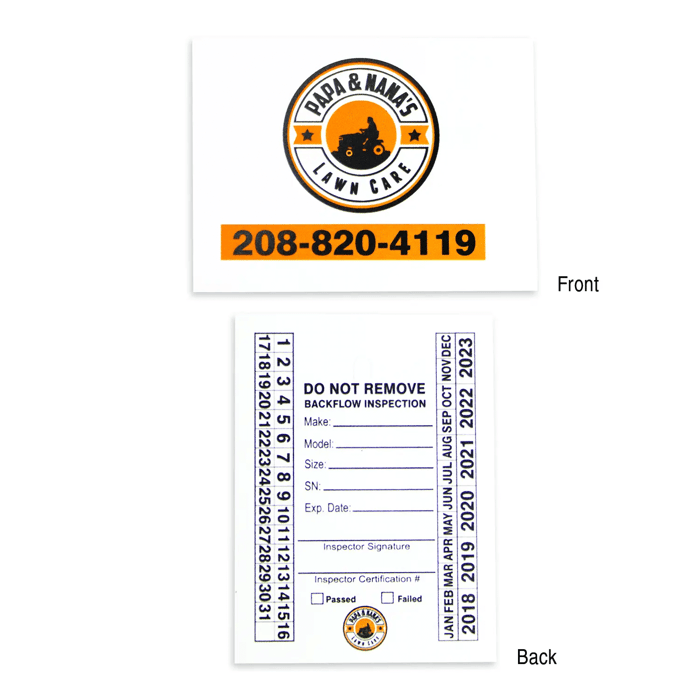
If visibility only matters from one angle, single-sided printing keeps things simple and cost-effective. The key is matching the print option to how, and where, the product will actually be used.
Printing options can vary by product and material, so be sure to review the product description to confirm whether two-sided printing is available for the item you’re ordering.
Step Three: Decide How Custom You Really Need to Go
Not every order needs a full design overhaul. Some projects work best with a simple logo and clean text. Others benefit from a more thoughtful layout or professional input. The key is knowing where you fall before you order.
Using Your Existing Logo or Artwork
If you already have branding, you’re most of the way there. A clear logo and basic direction are often enough to create a strong final product.
Blackburn accepts high-resolution artwork in the following formats:
.ai
.eps
.pdf
.jpg
.tiff
.png
Vector files (.ai or .eps) deliver the best print quality, especially for logos and text-heavy designs, because they scale cleanly without losing sharpness. You can upload your artwork during the ordering process or email it along with your order details (sales@blackburnflag.com).
Don’t have an electronic file? That’s not a dealbreaker. Our team can help digitize your logo and prep it for print, so you’re not stuck or delayed.
Once your artwork is on file, we keep it for future orders. That means faster reorders and consistent branding across products.
Working with a Designer (Recommended)
If you’re unsure how your design will translate to a flag, sign, tag, or tape product, that’s where our designers step in.
They help fine-tune spacing, color contrast, font size, and layout. These adjustments turn a “good enough” design into one that performs better and you’re actually excited about.
This support is especially helpful for custom marketing materials, where clarity matters just as much as branding. It also saves time by reducing revisions and avoiding common print issues.
Bottom line: you don’t need to have everything figured out. Whether you bring finished artwork or just an idea, Blackburn’s team helps you get it across the finish line.
Step Four: Proofs and Approvals
Every new custom design includes a digital proof, so you can see exactly how your product will look before it goes to print. This isn’t a rough concept: it’s a clear preview of layout, spacing, and placement, giving you the chance to review the details that matter.
Proofing helps catch any issues early and gives you room to make small adjustments before production begins, reducing surprises and avoiding reprints.
Once you approve the proof, your artwork is saved on file for future orders. That means quicker reorders, fewer steps the next time around, and consistent branding across everything from custom flag printing to custom yard signs, custom banners, and custom fans.
Faster Printing, Better Planning, Less Stress
Blackburn uses digital press printing, which gives you speed and flexibility without sacrificing quality. It’s a smart option for shorter runs, faster turnarounds, and designs that may change over time, like updated messaging, seasonal promotions, or repeat orders that don’t need new screens.
Digital printing also supports customization at scale, making it easier to fine-tune designs and move projects forward efficiently.
That said, even with fast production, customization still takes coordination, especially during busy seasons. Ordering in the fall and winter gives you more breathing room and better results. You’ll have:
More time to review proofs
More flexibility to refine your design with our artists
Fewer compromises on materials, options, or timelines
If your project ties to a specific date or peak season, planning ahead helps avoid last-minute stress and potential backlogs. Early orders don’t just move faster; they give you more control over the final, custom result.
Ready to Build Your Order?
From jobsite organization to brand promotion, customization works best when it’s done with intention and no stress.
Blackburn’s simple process allows you to start with the basics, add complexity where it adds value, and lean on a specialized design team when you want a second set of eyes.
Ready to build a custom order that performs in all the ways you want? Let’s get started.
FAQs
What file types work best for using logos or graphics on my custom order?
We accept high-resolution artwork in .ai, .eps, .pdf, .jpg, .tiff, and .png formats. For the cleanest print results, such as on custom printed marking flags, vector files (.ai or .eps) are preferred.
How do I submit my logo or artwork?
You can upload your artwork during the online ordering process or email it along with your order details. This process applies across products, from custom marker flags to signs and stickers.
What if I don’t have a digital logo file for my order?
The Blackburn team can help digitize your logo and prepare it for printing, so you can still move forward with a custom order.
Will I see a proof before my order is printed?
Yes. Every new custom design includes a digital proof for approval, allowing you to review layout, spacing, and placement before production begins on your custom utility marking flags, signs, tags, or other products in your order.
Does Blackburn keep my artwork on file for future orders?
Yes. We store your logo and artwork for future use, making reorders faster and helping maintain consistent branding. Custom screens not reordered within six years are removed from our files.
How do I choose the right size and print area?
Print area depends on the product size you select. Smaller items, like small custom yard signs, work best with short, clear messaging, while larger formats allow more flexibility in layout and content.
How do I order custom stickers?
If you’re wondering how to order custom stickers, the process is simple. Choose your sticker type and size, upload your artwork, review your proof, and approve before printing. If you need help during the order, our team is happy to assist.
Do larger Blackburn orders qualify for freight discounts?
Yes. Orders weighing 125 lbs. or more qualify for multi-weight freight discounts, allowing Blackburn to reduce overall shipping costs and pass those savings directly on to customers.